Using TeamSnap
MTL Soccer uses TeamSnap to manage teams, rosters, schedules, and communication. All parents and coaches should have the TeamSnap app installed.
Setting Your Availability
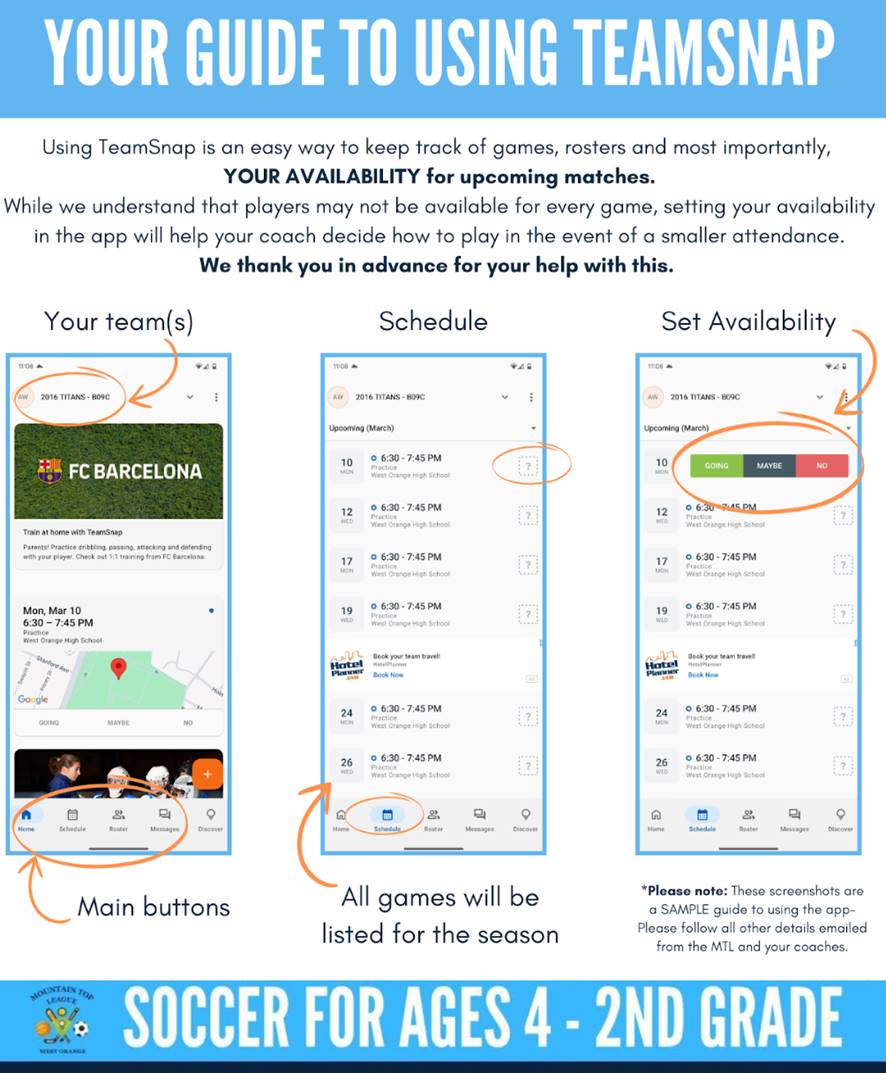
Please update your attendance for each session. This helps your coach plan the lineup and decide how to play in the event of a smaller attendance.
How It Works
- Open the TeamSnap app and find your team
- Check the Schedule to see upcoming games
- Tap Set Availability to mark whether your child will attend each session
We understand that players may not be available for every game. Setting your availability in the app lets your coach decide how to manage the roster for each session. We thank you in advance for your help with this.
What Coaches Use TeamSnap For
- Messaging your team — send updates, reminders, and game-day details to all parents at once
- Tracking rosters — only players on the official TeamSnap roster should receive uniforms or participate in activities
- Game schedules — all games will be listed in the app with times, field locations, and field assignments
Getting Started
If you haven’t received a TeamSnap invitation for your child’s team, contact your coach or email MTLsoccer@gmail.com.